.svg)
Quick summary
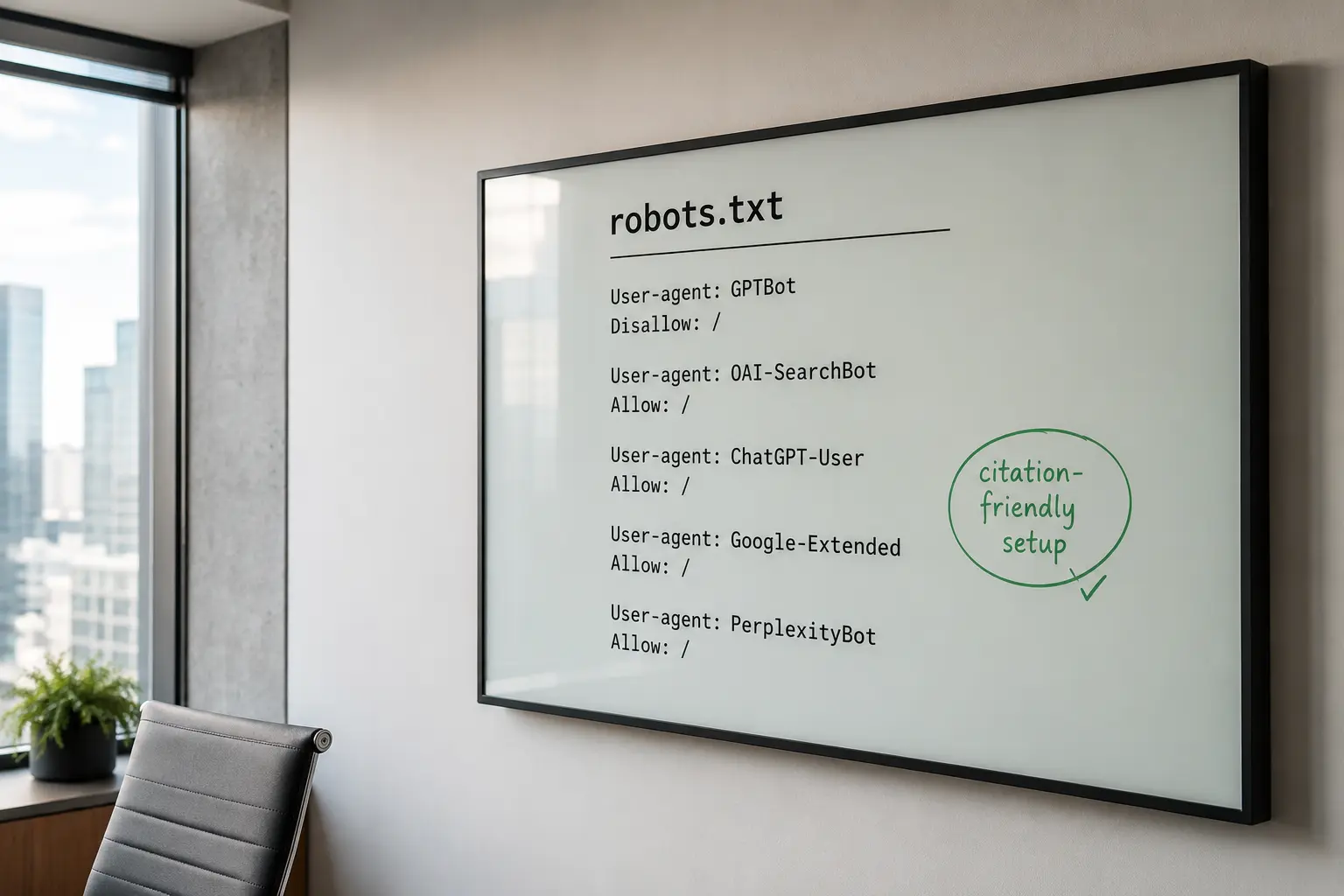
GPTBot gathers content to train OpenAI's models and sends you almost nothing back. OAI-SearchBot indexes your pages so ChatGPT can cite you in its answers. Blocking GPTBot opts you out of training with little downside; blocking OAI-SearchBot deletes you from ChatGPT search. The right robots.txt blocks the first and allows the second.
- GPTBot is the training crawler, OAI-SearchBot the search crawler
- Blocking GPTBot rarely costs you visibility
- Blocking OAI-SearchBot removes you from ChatGPT answers
- ChatGPT-User is user-triggered and behaves differently
- Robots.txt is advisory, so pair it with real controls if needed
.svg)
Who this is for
This is for owners, marketers and technical leads who want to opt out of AI training on their content without disappearing from ChatGPT, and want the exact rules to do it.
- Publishers and businesses protective of their content who still want AI search reach
- Technical leads writing or auditing a robots.txt for AI crawlers
.svg)
Evidence base
Across 200+ AI visibility audits we ran between October 2024 and June 2026, one avoidable mistake kept surfacing: a robots.txt that blocked every bot with OpenAI in the name, quietly taking the business out of ChatGPT search while barely slowing the training it was meant to stop. The fix was almost always the same one line change.
.svg)
Methodology
We reviewed how OpenAI documents and separates its crawlers, matched each against independent data on what it actually does on the web, and confirmed the robots.txt behaviour that keeps a business in ChatGPT search while opting it out of training. The rules below reflect that, applied across the sites we audited.
.svg)
Limitations
Crawler names and behaviours change, and OpenAI has already added bots since it first launched GPTBot, so treat the specifics here as current rather than permanent. Robots.txt is also advisory, so it works with compliant crawlers and needs stronger controls where genuine protection matters. None of this removes content a model was already trained on.

Implementation checklist
Use this list to audit and improve your AI visibility after reading this guide.
- Identify which OpenAI bots are hitting your site from your server logs
- Disallow GPTBot in robots.txt if you want to opt out of training
- Explicitly allow OAI-SearchBot so you stay visible in ChatGPT search
- Apply the same block-training, allow-search logic to other providers
- Remember ChatGPT-User is user-triggered and behaves differently
- Add network-level controls if you need real protection, not just a signal
- Re-test the file after any change, since mistakes fail silently
- Ask ChatGPT your buyers' questions to confirm your citations hold
Sources and references
Primary sources, official documentation, research and SkyScale audit data cited in this article.
- OpenAI's crawler docs now list OAI-AdsBot for ChatGPT ads — Search Engine Journal
- From Googlebot to GPTBot: who's crawling your site in 2025 — Cloudflare
- Large language model — Wikipedia
- OpenAI starts testing SearchGPT prototype — Search Engine Land
- Tools and software to manage AI crawlers accessing your site — Search Engine Land
- Declaring your AIndependence: block AI bots with a single click — Cloudflare
Frequently Asked
What is the difference between GPTBot and OAI-SearchBot?

GPTBot is OpenAI's training crawler, gathering content to train its models. OAI-SearchBot is its search crawler, indexing your pages so ChatGPT can cite you in answers. They do opposite jobs, which is why you can block one to opt out of training while allowing the other to stay visible in ChatGPT search.
Will blocking GPTBot remove me from ChatGPT?
No, as long as you keep OAI-SearchBot allowed. Blocking GPTBot only opts you out of training; it does not affect the separate search crawler that decides whether you appear in ChatGPT answers. Businesses vanish from ChatGPT when they accidentally block the search bot too, usually via a blanket block of everything OpenAI.
How do I opt out of AI training but stay in AI search?
Disallow GPTBot and allow OAI-SearchBot in your robots.txt. That combination signals your content should not be used for training while keeping you eligible to be cited in ChatGPT search. OpenAI deliberately separates the two so publishers can make exactly this choice.
Does blocking GPTBot remove my content from models already trained on it?
No. The opt out is forward looking, so it stops future training use but does not delete content a model has already learned from. That is a reason to set your rules sooner rather than later, since the block only affects crawling from the point you apply it onward.
Is robots.txt enough to protect my content?
Only from well behaved crawlers. Robots.txt is advisory, so compliant bots respect it but others can ignore it. For genuine protection you need network-level controls, such as behavioural bot blocking, that can stop a scraper even when it disguises its identity, rather than relying on a polite request alone.
What about ChatGPT-User and OAI-AdsBot?
ChatGPT-User is triggered when a person asks ChatGPT to visit a page, so it is user-initiated rather than an automatic crawler and behaves differently from GPTBot. OAI-AdsBot checks pages submitted as ChatGPT ads and does not use its data for training. Neither changes the core GPTBot versus OAI-SearchBot decision.
Authorship and review

Written by

Reviewed by
Lachlan McDonald
· AI Search & Data Engineering Reviewer
.svg)

.svg)


.svg)
.svg)
.svg)

.svg)
.svg)